 FollowBell
Add their account to FollowBell, a following tracker for public Instagram accounts. You see everyone they follow, then you hear about each new follow and each unfollow.
The first look is free, with no Instagram account, and they won't know.
What is an Instagram following tracker?
An app that reads the list of accounts someone follows, reads it again and again, and tells you what changed: who they started following, who they stopped following.
Instagram won't do it for you. It tells nobody when an account follows someone new, and it never shows a follow date.
How to track who someone follows, in three steps
- Type their username into FollowBell, in your browser or in the Android app. No Instagram account needed.
- See their list: how many accounts they follow, how many are women and how many men, then every name.
- Turn on alerts. From then on, each new follow and each unfollow reaches you: a notification on Android, an email on the web.
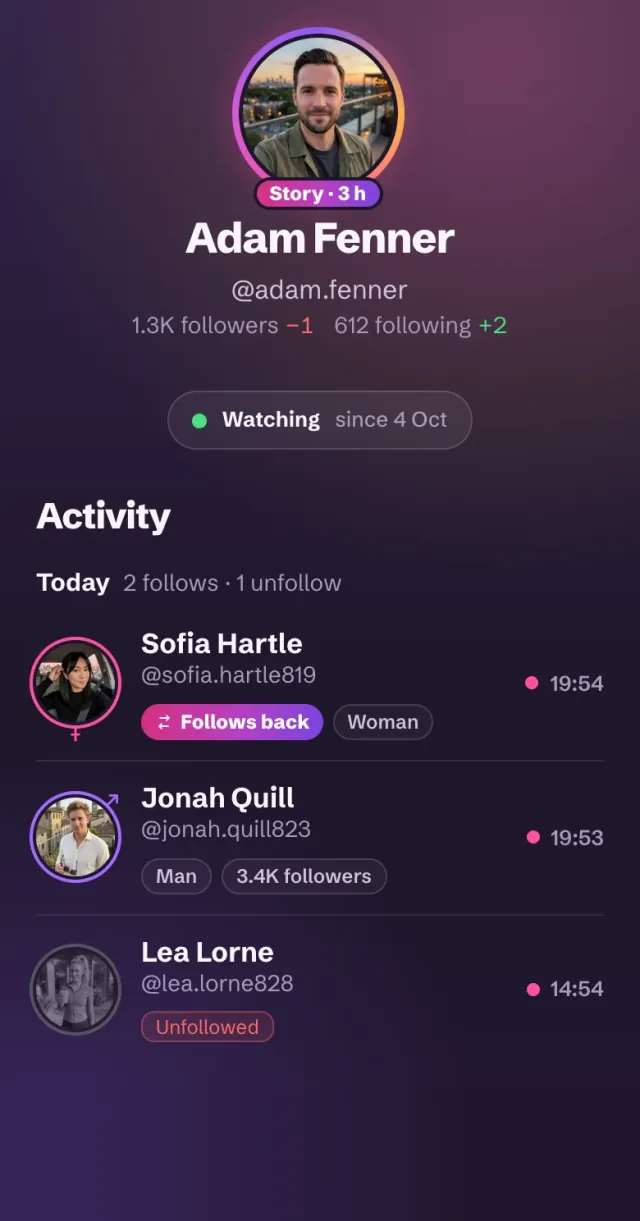
Every change also lands in a journal, day by day. If Adam follows Sofia on Monday and unfollows her on Thursday, you see both. A list read on Friday would show neither.
Recent follows: what a tracker can show you
From the day you add an account, every new follow is a recent follow you'll hear about. It shows up with the time FollowBell caught it, marked “Follows back” when the other person already follows them.
Before that day, no tracker can tell which follows are recent. Their list holds every account they follow, old and new, and nothing in it is dated. How to see who someone recently followed goes through every option.
Instagram's following list isn't in chronological order
On your own profile, you can sort your list by date followed. On anyone else's, Instagram picks the order, and the top isn't their latest follows. We measured it: on a real account, none of the ten accounts at the top was among his 50 latest follows.
Since 9 September 2026, apps get that ranked order too, with no dates. Trackers that read “the top of the list” as recent follows started showing accounts followed months or years ago. What changed, and a two-minute test for any tracker.
FollowBell never relied on that order. It compares the whole list over time: a name that wasn't there before is a new follow, wherever it sits.
The time shown is when the follow was caught
Instagram records no follow date anyone can read. So when FollowBell says “2 h ago”, it means caught 2 hours ago, not followed 2 hours ago.
Any app that shows the exact date of an old follow is inventing it.
Instagram follower tracker or following tracker?
An Instagram follower tracker watches who follows an account, usually your own. Many ask for your Instagram password to do it.
A following tracker looks the other way: who an account follows. That's what FollowBell does, for any public account, without your password. With each new follow, it also tells you whether that person follows them back.
Instagram following viewer: see who someone follows
In Instagram, open their profile and tap “following”. You have to be logged in, and the account has to be public.
Without an Instagram account, type their username into FollowBell: you see how many they follow, how many are women and how many men, then the whole list.
The list is yours to sort through. Filter women, men or other in one tap, search a name, or sort it A to Z.
How do you see someone's unfollows on Instagram?
Instagram doesn't show them. An account they drop simply disappears from their list.
To see it, you have to compare their list from one day to the next. FollowBell does it for you: every unfollow reaches you, just like every new follow.
What happens if they go private?
You hear about it: going private is one of the profile changes FollowBell alerts you to.
From then on, their list is for their followers only, so the follow alerts stop. Your journal keeps everything caught before.
Can you do it yourself, without an app?
Screenshot their list today. Come back in a few days and compare: the new names are their new follows, the missing ones their unfollows.
That works on a small account. Past a few hundred, in an order Instagram ranks rather than dates, you'll miss some.
What's free and what's paid
Free: type a username and FollowBell shows their profile, how many accounts they follow, and a blurred first page of their list, with women and men counted. Verified accounts in it show in full. Our story viewer is free too.
With a subscription: every name in the list, alerts for new follows and unfollows, their stories, profile-change alerts, and two accounts checked against each other. Weekly or yearly, and you see the price before you pay.
How FollowBell compares to other trackers
Ask any tracker these questions before you pay. Here are FollowBell's answers.
| Ask the tracker | FollowBell |
|---|---|
| Does it need my Instagram password? | No, never |
| Does it show a follow date? | No: the time a follow was caught, labelled that way |
| Does it list “recent follows” from before I started? | No: the list isn't sorted by date |
| Does it alert me to new follows? | Yes, and to unfollows |
| Does it open private accounts? | No. No tool can |
| Does it show profile visitors? | No. Instagram shows them to nobody |
| What can I see before paying? | Their profile, how many they follow, a blurred first page |
| Where does it run? | Android, and any browser on iPhone or a computer |
A tracker that says yes to follow dates, private accounts or profile visitors is promising what Instagram doesn't give out. One that wants your password puts your account at risk.
What FollowBell shows you
- every account they follow, with how many women and men;
- each new follow and each unfollow, marked “Follows back” when it goes both ways;
- their new stories and profile changes (bio, photo, going private);
- their stories, without showing up in the viewer list;
- whether two accounts follow, like or tag each other.
What no tracker can tell you
- When an old follow happened. Instagram gives no date.
- What they followed before you started. You see today's list, not its history.
- Who a private account follows. Only its followers can see that.
- Who viewed a profile. Instagram shows that to nobody.
An app that promises any of this is making it up. And if it asks for your Instagram password, close it.
Add their account, we’ll tell you
Every account they follow, then an alert for each new follow. No Instagram account, on Android or in your browser.