 FollowBell
Everything someone likes: nobody can show you that. Instagram removed the tab that listed it in 2019, and no tool has it since.
What you can check is narrower, and usually the real question: did this person like that account's recent posts? Every public post shows who liked it. Look for the name, and a like you find is a fact.
What Instagram used to show, and stopped
Until October 2019, Instagram had a Following tab next to your notifications. It listed what the people you follow were liking and commenting on, as it happened. Instagram removed it, saying people did not always know their activity was on show.
Nothing came back in its place. There is no list of the posts someone liked, on their profile or anywhere else, and a site or app that promises "everything they like" cannot deliver it.
What you can still check
The likes are still visible from the other side. On a public account, every post has a list of the accounts that liked it. So the question you can answer is not "what does she like?" but "did she like his posts?", and the reverse.
By hand
- Open the profile whose posts you want to check.
- Open a post and tap the likes under it.
- Look for the other person's name in the list.
- Do it again for each post you care about, then swap the two accounts to check the other way.
On a small account it takes a few minutes. On posts with hundreds or thousands of likes, in both directions, it gets long, and it is easy to miss a name.
Does he like her posts?
That is usually the real question, and it has a real answer. Open her latest posts, tap the likes, search his name. Then the other way: does she like his?
A like you find is a fact. Not finding one on a post with thousands of likes proves less, because the full list does not always load.
How FollowBell checks it
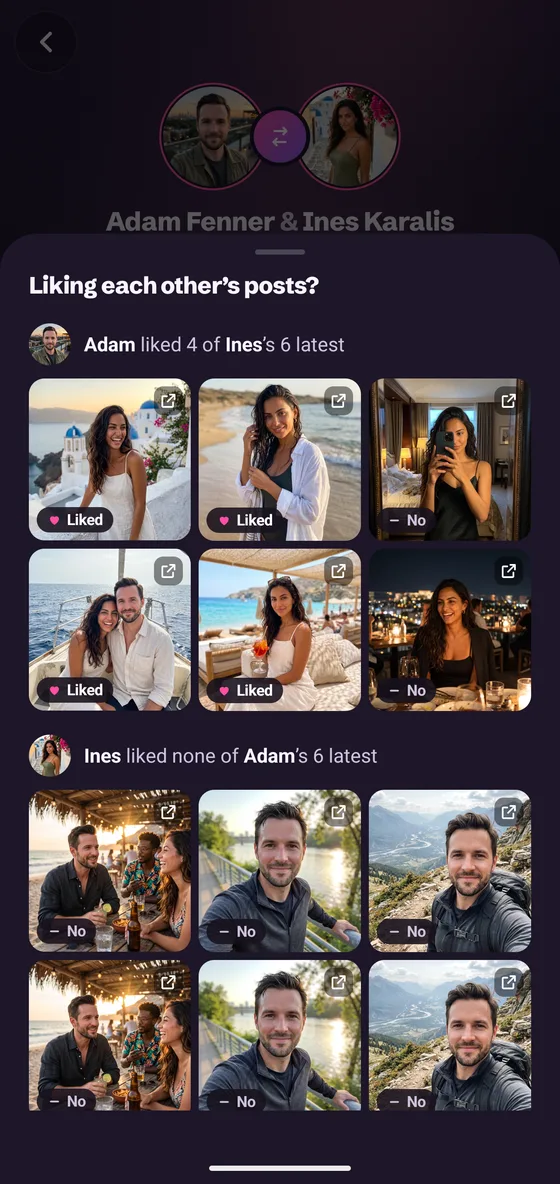
In FollowBell, an Android app for public Instagram accounts, you pick two accounts and check them together. The answer reads both ways:
- Likes on the six most recent posts of each, pinned posts aside: “Adam liked 4 of Ines’s 6 latest”, and the same the other way.
- Whether they follow each other, in both directions.
- Whether either tagged the other in their recent posts.
Each answer says what it read. You can see the posts as small thumbnails, each marked liked or not, and a tap opens it in Instagram. Come back later, check again, and what changed since is marked as new.
No Instagram login is involved at any point, so neither account sees anything.
| Question | Answer |
|---|---|
| Did they like this account's recent posts? | Yes, checkable, both ways, on public posts |
| Everything they like on Instagram | No app can since 2019: Instagram removed that list |
| When they liked a post | No app can: a like carries no date |
| A private account's posts | No app can open them |
| A private account's like on a public post | Yes, it shows in that post's likes |
| A post with more than about 1,000 likes | Partly: a like found is certain, a like not found proves nothing |
A yes is proof. A no is only a no when the whole list could be read. That is why FollowBell marks a very popular post as “couldn't be checked” rather than answering no.
Why there are no dates
Instagram shows who liked a post, never when. A like on a two-year-old post looks exactly like a like from this morning. FollowBell does not show a date for a like, because there is none to show. What it can tell you is what changed between two of your checks.
Check two accounts
Likes, follows and tags between two public accounts, both ways, in one answer. No Instagram login. Android, on Google Play.